Auto Logout
Sign out idle WordPress users after a timeout you choose.
- Idle timeout in minutes, from 1 minute up to 30 days
- Optional warning dialog with a countdown and a "Stay signed in" button
- Per-role idle timeouts, with the shortest timeout winning for multi-role users
- Replace WordPress's 2-day and 14-day login durations with your own
- Server-side enforcement — closing the tab or disabling JavaScript does not extend a session
- No cron job and no polling; page views renew a throttled activity timestamp
- Works with the free Loggedin core plugin
- Automatic updates & support while licensed
- 1, 5 or 10-site licenses
- 7-day money-back guarantee
- Documentation docs.foxelabs.com (opens in new tab)
- Loggedin core plugin Free · required
- Get support Straight to the team
Requires the free Loggedin plugin to be installed and active.
About Auto Logout
Automatically log out inactive WordPress users after a set idle timeout — with a warning countdown, per-role timeouts, and control over how long a login lasts.
What it does
WordPress has no setting for how long an unattended session should stay open, or how long a login should last at all. Auto Logout adds both.
Set an idle timeout in minutes and any session that stops being used is ended — the user lands on the login screen with “You were signed out because your session was inactive.” Only the idle device is signed out; their other devices keep their own sessions and their own countdowns.
Idle logout ships switched off. Turning it on seeds a 15-minute timeout you can raise or lower, up to 30 days.
Warn before signing out
A countdown dialog appears before the session ends — 60 seconds by default — so someone who stepped away mid-form can choose to stay signed in, sign out immediately, or do nothing and be signed out when it hits zero. Set the warning to zero to sign people out with no dialog at all.
Activity in one tab keeps every other tab alive with no extra server requests, and a tab that was suspended re-checks the clock when it comes back rather than acting on a stale timer.
Per-role timeouts
Five minutes for administrators and shop managers, an hour for subscribers who are only reading — the usual shape for a compliance-driven site. Roles you don’t list fall back to the global timeout, and custom roles registered by another plugin or your theme appear automatically.
When a user holds several roles that each have a rule, the shortest timeout wins. That’s deliberately the reverse of Limit Per Role, where the most permissive cap wins: a session limit denies access, so the loose value is the safe one, while an idle timeout only ends a session nobody is using.
Session length
Idle timeout and session length are different controls, and most compliance
rules ask for both. WordPress logins are valid for 2 days, or 14 days when
Remember Me was ticked. Auto Logout replaces either or both with your own
durations, applied through the auth_cookie_expiration filter — so a login
can’t stay valid for a fortnight just because someone keeps clicking.
Enforcement without cron or polling
Enforcement is server-side. Closing the tab, disabling JavaScript, or killing the script buys nobody a longer session: the check runs early on every authenticated request. There’s no cron job and no polling loop — page views renew a per-device “last active” timestamp, throttled to at most one write per quarter of the timeout and never more than one a minute.
Background requests deliberately don’t count as activity. The WordPress heartbeat fires from any open admin tab every 15 to 60 seconds, so treating it as activity would keep an unattended dashboard signed in forever. Long stretches of genuine single-page work — the block editor, a WooCommerce screen — are covered by a lightweight ping the browser sends only while you’re actually interacting.
Pair it with Real-time Logout so an idle logout propagates to every open tab within the polling interval, and with Active Sessions to see and clear sessions by hand.
Auto Logout in the WordPress admin
Every screen Auto Logout adds, and where to find it.
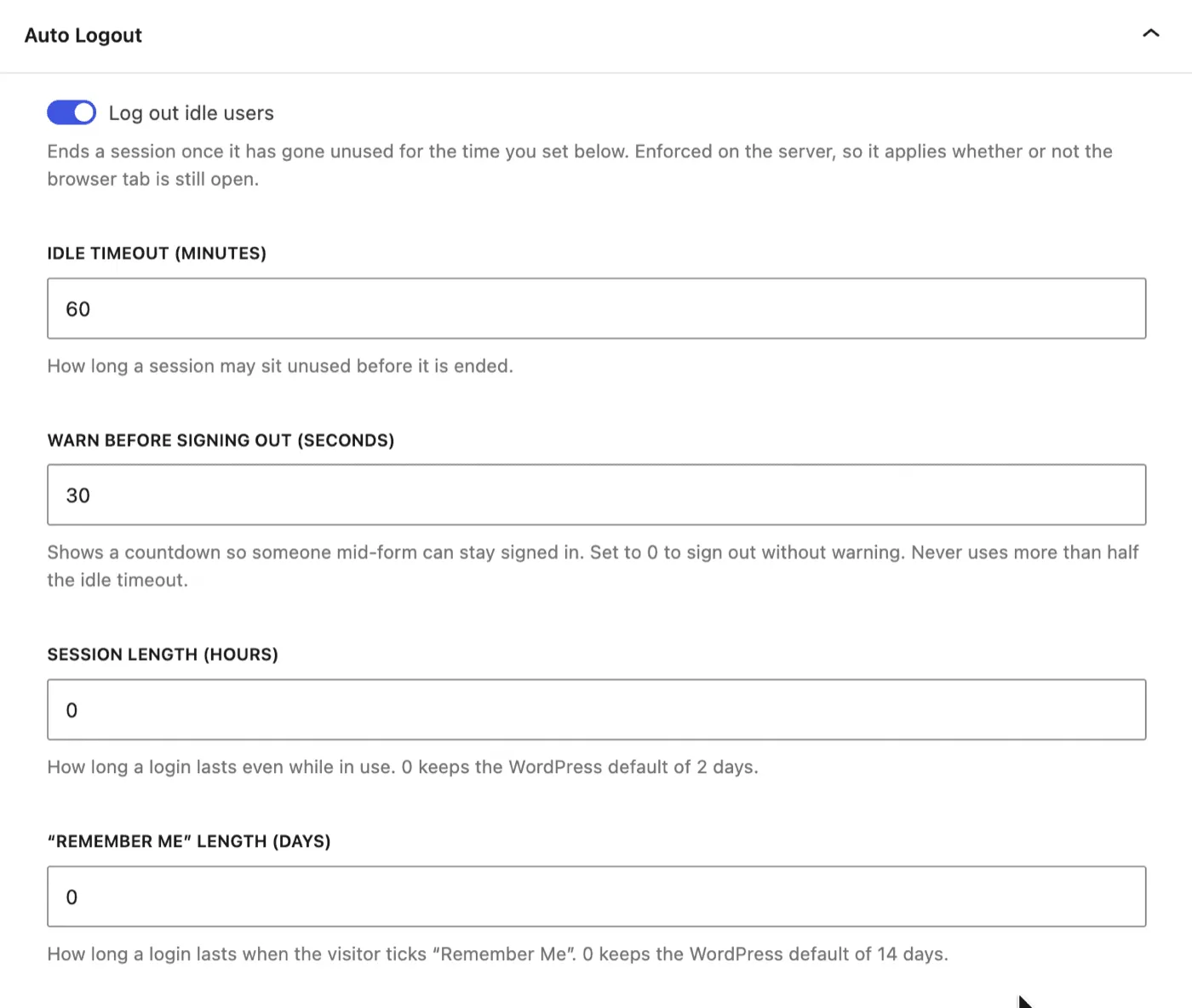
Idle timeout and warning, in one panel
Turn idle logout on, then set how long a session may sit unused, how long the warning dialog appears first, and how long a login lasts even while in use.
Idle logout ships switched off — signing people out is a deliberate choice, not a side effect of activating the add-on.
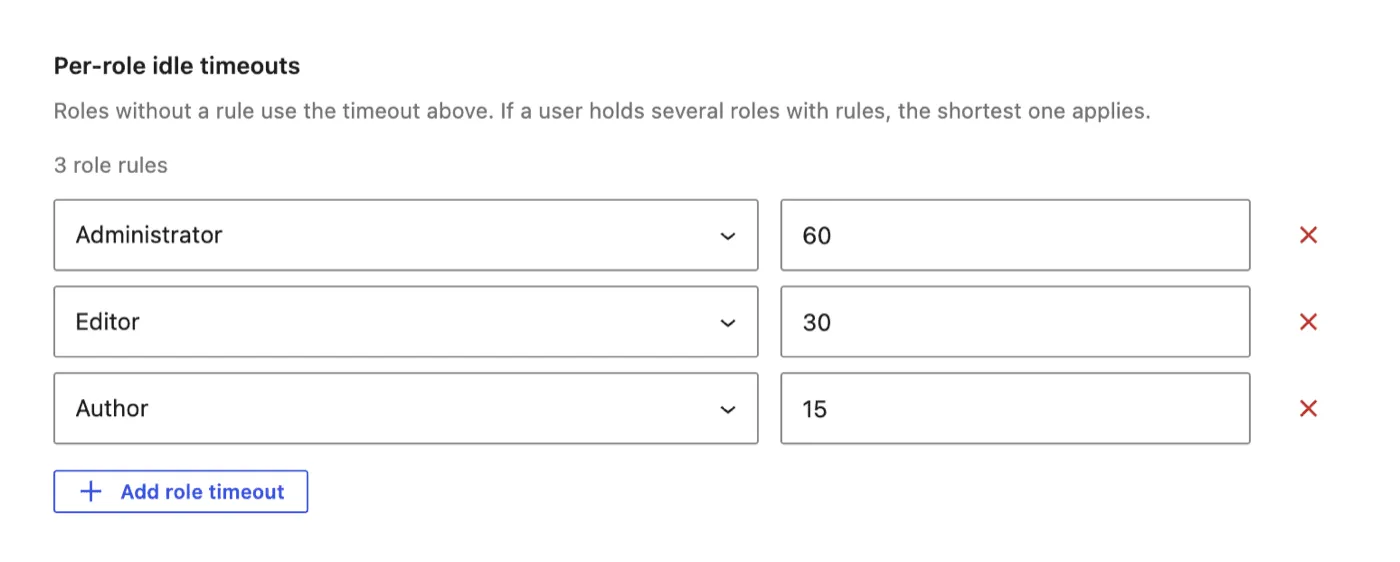
An hour for admins, fifteen minutes for authors
Add a row per role to override the global timeout. Roles you don't list keep the global value, and custom roles appear in the picker automatically.
When a user holds several roles with rules, the shortest timeout applies.
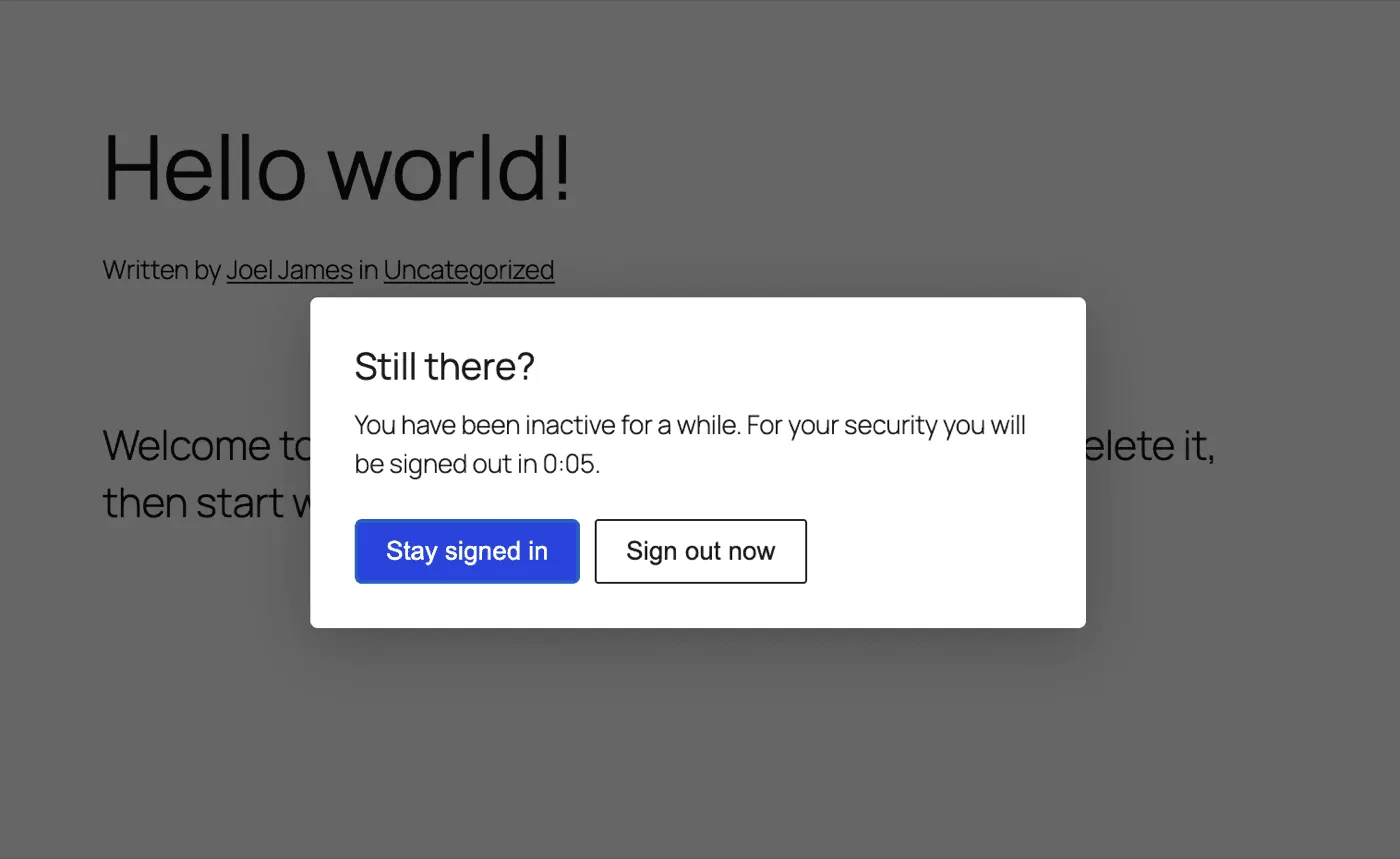
What the user sees
A countdown dialog before the session ends. Stay signed in renews it and restarts the timer, Sign out now ends it immediately, and ignoring it signs them out at zero.
Activity in one tab keeps every other tab alive, with no extra server requests.
Frequently asked questions
How do I automatically log out idle users in WordPress?
Install the free Loggedin plugin, add the Auto Logout add-on, and set an idle timeout in minutes on the Loggedin settings tab. Any session that goes unused for longer than that timeout is ended, and the user lands back on the login screen.
What is a good idle timeout for WordPress?
Fifteen minutes is the default and suits most sites. Compliance-driven setups often use five minutes for administrators and shop managers, and an hour or more for subscribers who are only reading. Auto Logout lets you set both with per-role timeouts.
Can I set a different auto logout time for each user role?
Yes. Each role can have its own idle timeout, and roles you do not list fall back to the global value. When a user holds several roles with rules, the shortest timeout applies — the opposite of the Limit Per Role add-on, which uses the most permissive session cap.
Does auto logout still work if JavaScript is disabled?
Yes. Enforcement is server-side — the idle check runs early on every authenticated request, so an expired session is ended on that device's next request. The browser script only makes the logout happen on time and shows the warning countdown.
How do I change how long a WordPress login lasts?
WordPress hard-codes 2 days, or 14 days when "Remember Me" is ticked. Auto Logout replaces both with values you set, in hours and days, applied through the auth_cookie_expiration filter — no code snippet needed. New durations apply from each user's next sign-in.
Will auto logout slow down my site?
No. There is no cron job and no polling. A page view renews an activity timestamp at most once per quarter of the timeout and never more than once a minute, so a 20-minute timeout costs roughly one small database write per user per five minutes of browsing.
Does the WordPress heartbeat keep an idle session alive?
No. The heartbeat fires every 15 to 60 seconds from any open admin tab, so counting it as activity would keep an unattended dashboard signed in forever. AJAX and REST requests are checked but never treated as activity. WP-CLI and cron are exempt entirely.
Learn how we can help you build better.
Questions about a plugin, a licence, or an expert advisor — ask and get a straight answer from the team that wrote the code.