Loggedin
The free WordPress session manager. Limit concurrent logins, log out idle users and sign anyone out of every device.
- Limit concurrent logins per account, from one device upwards
- Logout Oldest, Logout All or Block New when someone goes over the limit
- Auto logout idle users, with a countdown and a timeout per role
- Force logout one user, or every user on the site at once
- Blocked users can email themselves a link to sign out their other devices
- Sessions and last login on the Users screen, and "Your sessions" on every profile
- License
- GPL-2.0-or-later
- Language
- PHP
- Requires
- PHP 7.4+
- Since
- 2016
- Installs
- 8,000+ active installs
- Rating
- 4.9★ (112 ratings)
What you get out of the box
Limit concurrent logins
Set how many devices one account can be signed in on. Sign out the oldest device, sign out every other device, or refuse the new login. Leave administrators out so nobody locks themselves out.
Auto logout idle users
Sign out sessions nobody has used for a set number of minutes, after a countdown warning. Give each role its own timeout, and set how long a login lasts with and without Remember Me.
Force logout, everywhere
End every session of one user from the Sessions page, the Users screen or WP-CLI, or log out all users at once. It's instant at any user count, and your own session stays signed in.
Lockout recovery
A user blocked by the limit can email themselves a single-use link that signs out their other devices. It's offered only after the right password and expires after 15 minutes.
See who is signed in
Session counts and a sortable Last login column on the Users screen. Each user sees their own devices under Your sessions, with a Sign out button for each.
Built for developers
WP-CLI commands, a REST API under loggedin/v1, and documented actions and filters for every decision. It uses the standard WP_Session_Tokens API, with no cron and no remote calls.
Loggedin in the WordPress admin
Everything Loggedin adds to wp-admin, and where to find it.
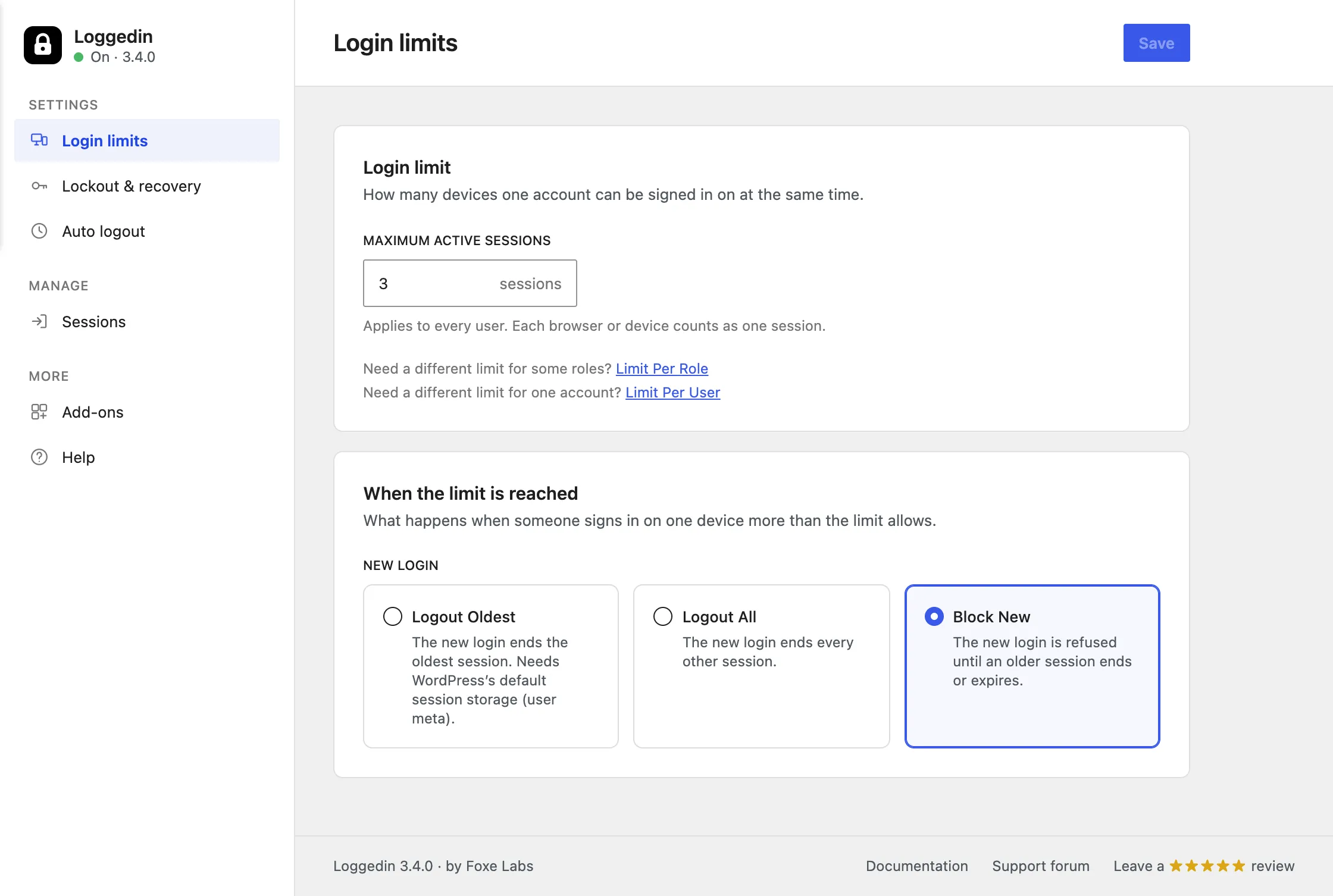
One number, one rule
Set how many devices an account can be signed in on, then choose what happens when a new login goes over the limit.
Changing the limit never signs anyone out on the spot. It applies from the next login.
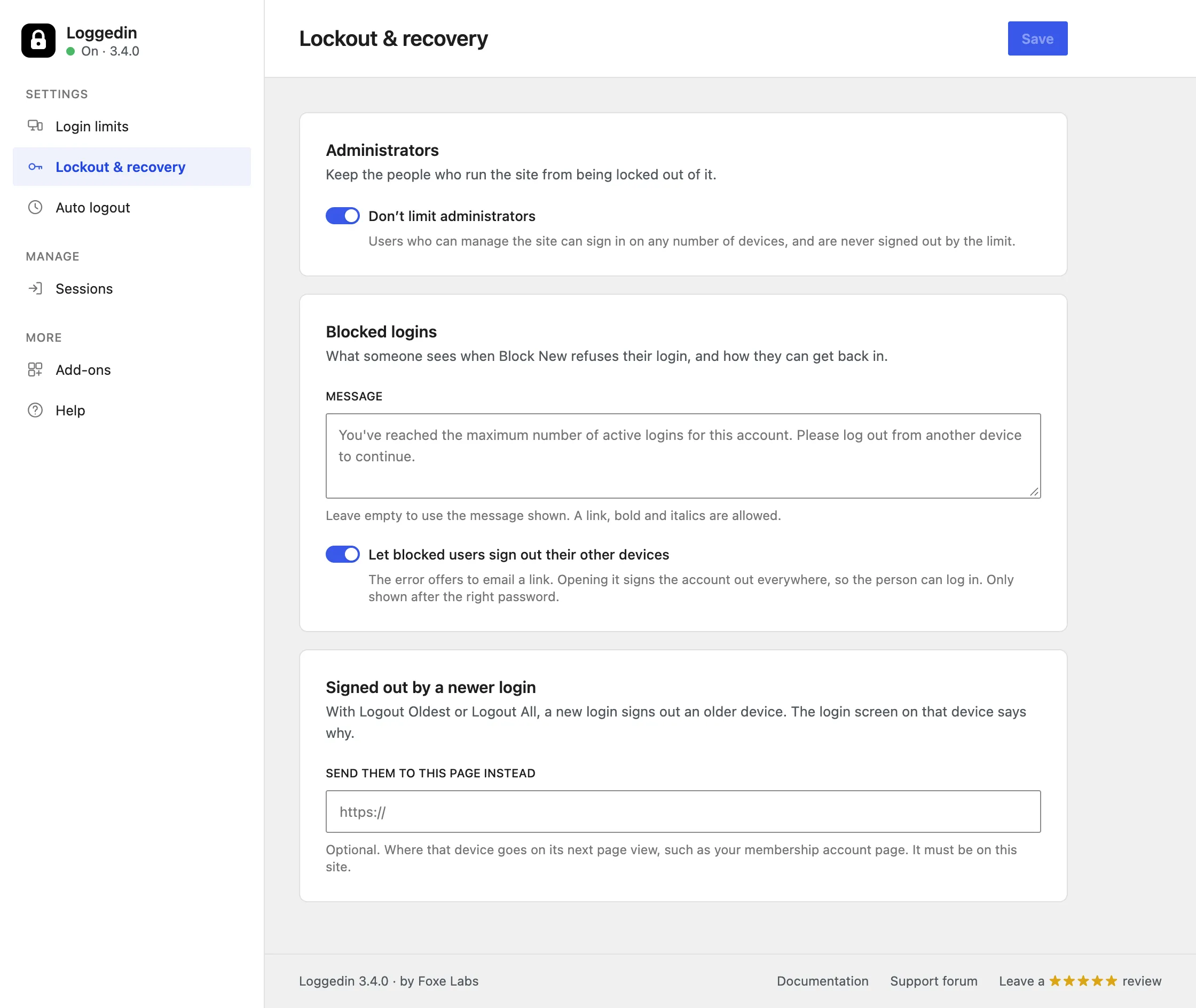
Strict limits without support tickets
Leave administrators out of the limit, write your own blocked-login message, let blocked users unlock themselves by email, and choose where signed-out devices go.
The unlock link is offered only after the right password, so it never reveals whether an account exists.
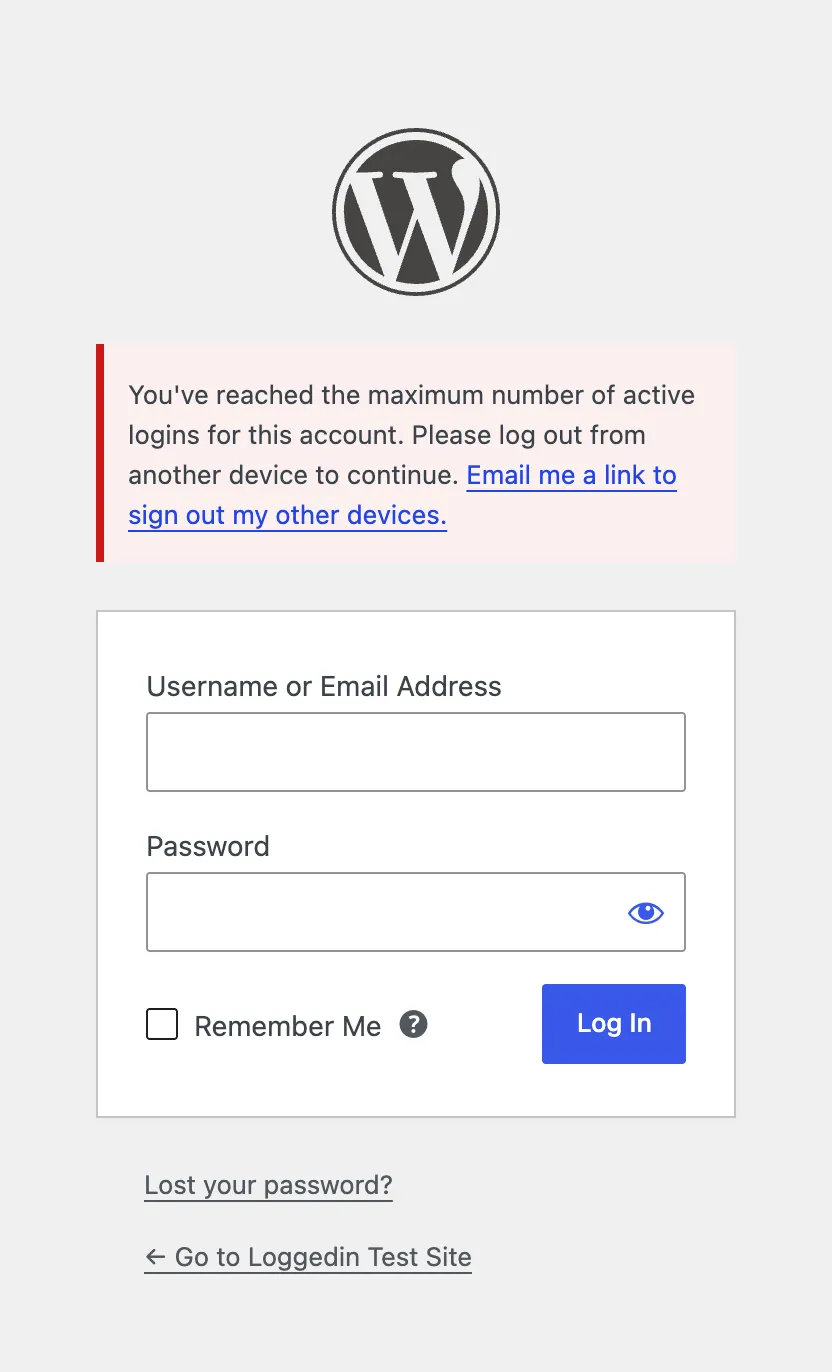
A clear message, and a way out
With Block New, a user at the limit is told why the login was refused, with a link that emails them a way to sign out their other devices.
The link is single-use and expires after 15 minutes.
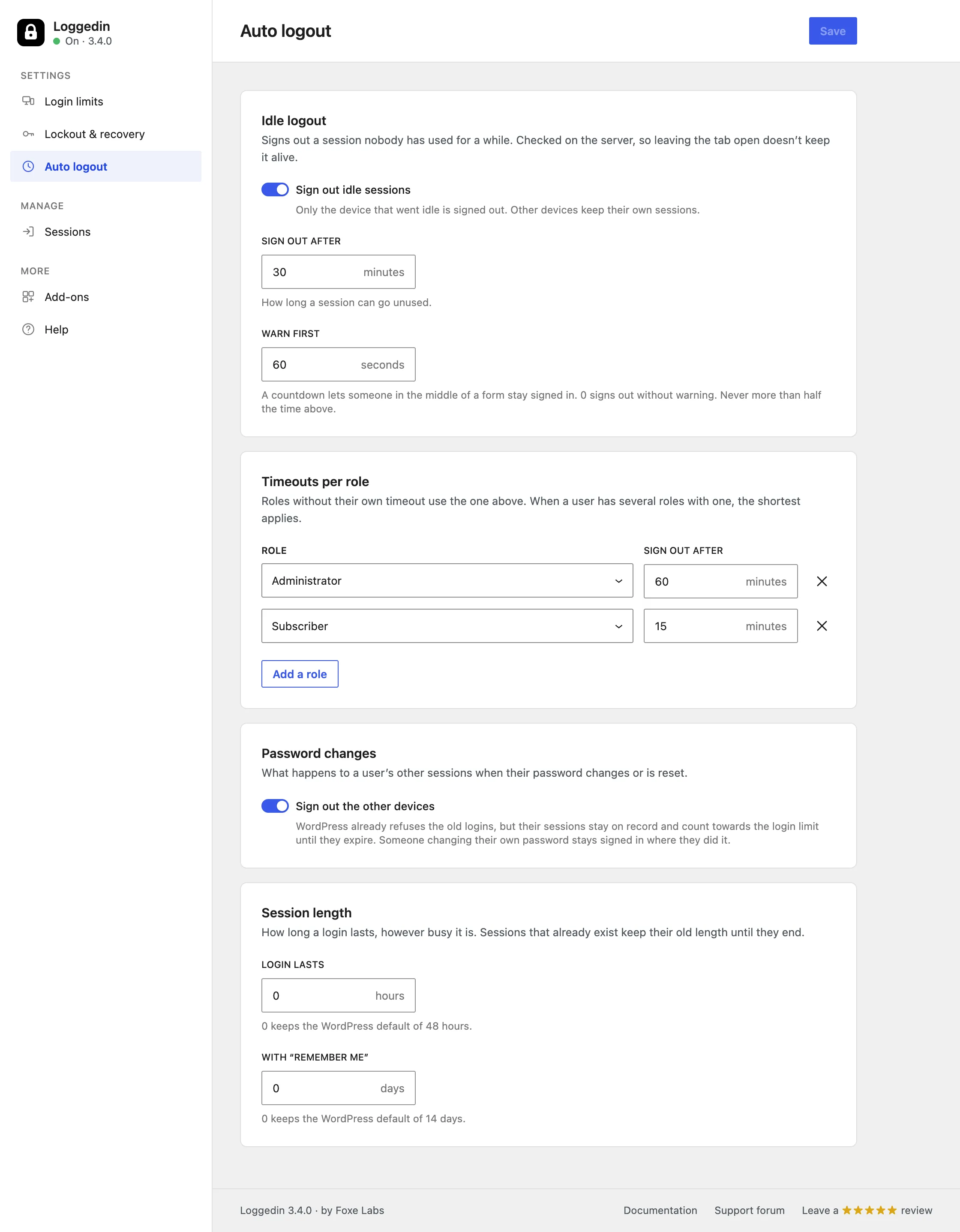
Auto logout, now free and built in
Sign out idle sessions after a countdown, give each role its own timeout, sign out other devices on a password change, and set how long a login lasts.
The idle check runs on the server, so a forgotten open tab doesn't keep a session alive.
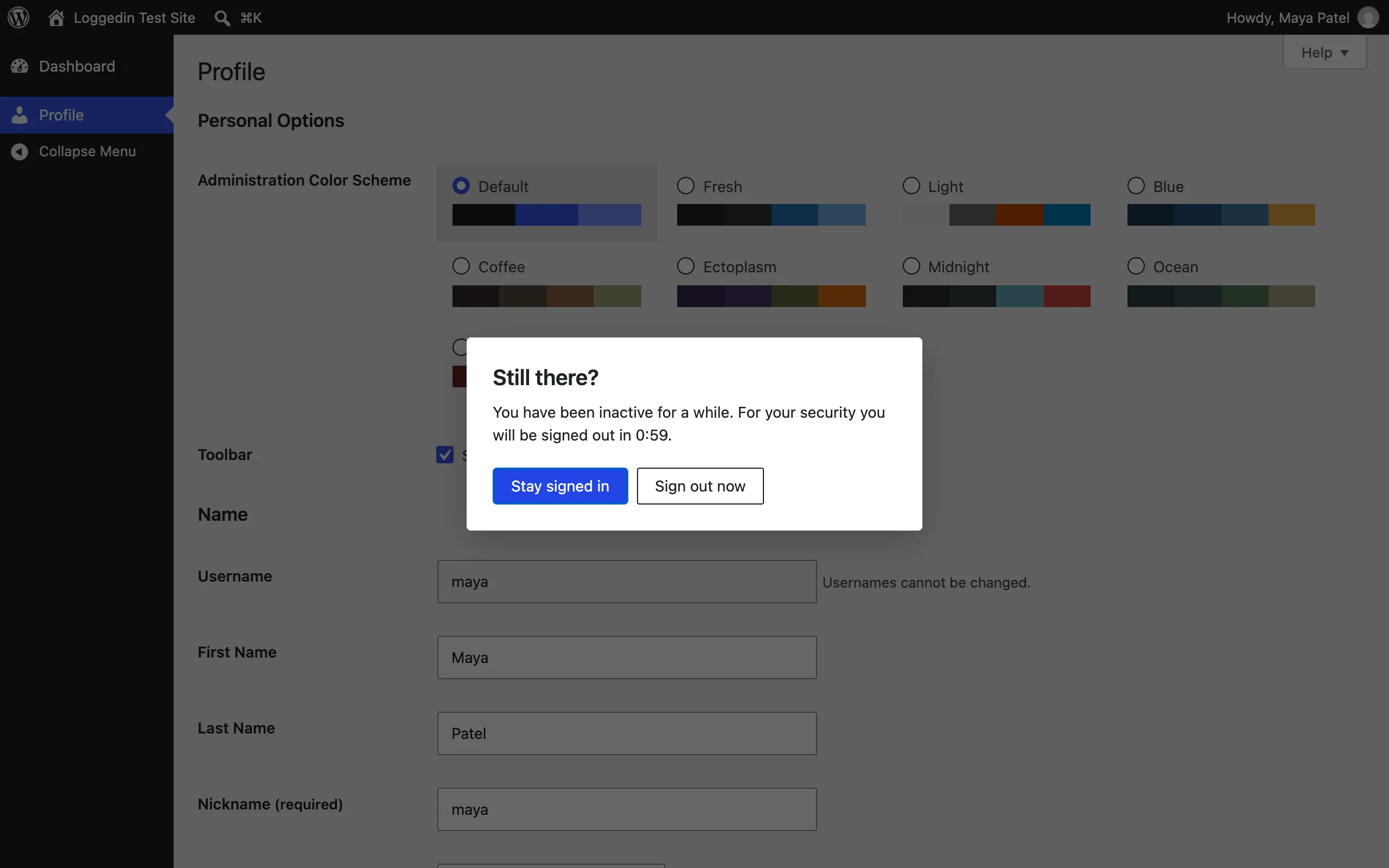
Fair warning before the logout
Users see a countdown before an idle session ends, with buttons to stay signed in or sign out now.
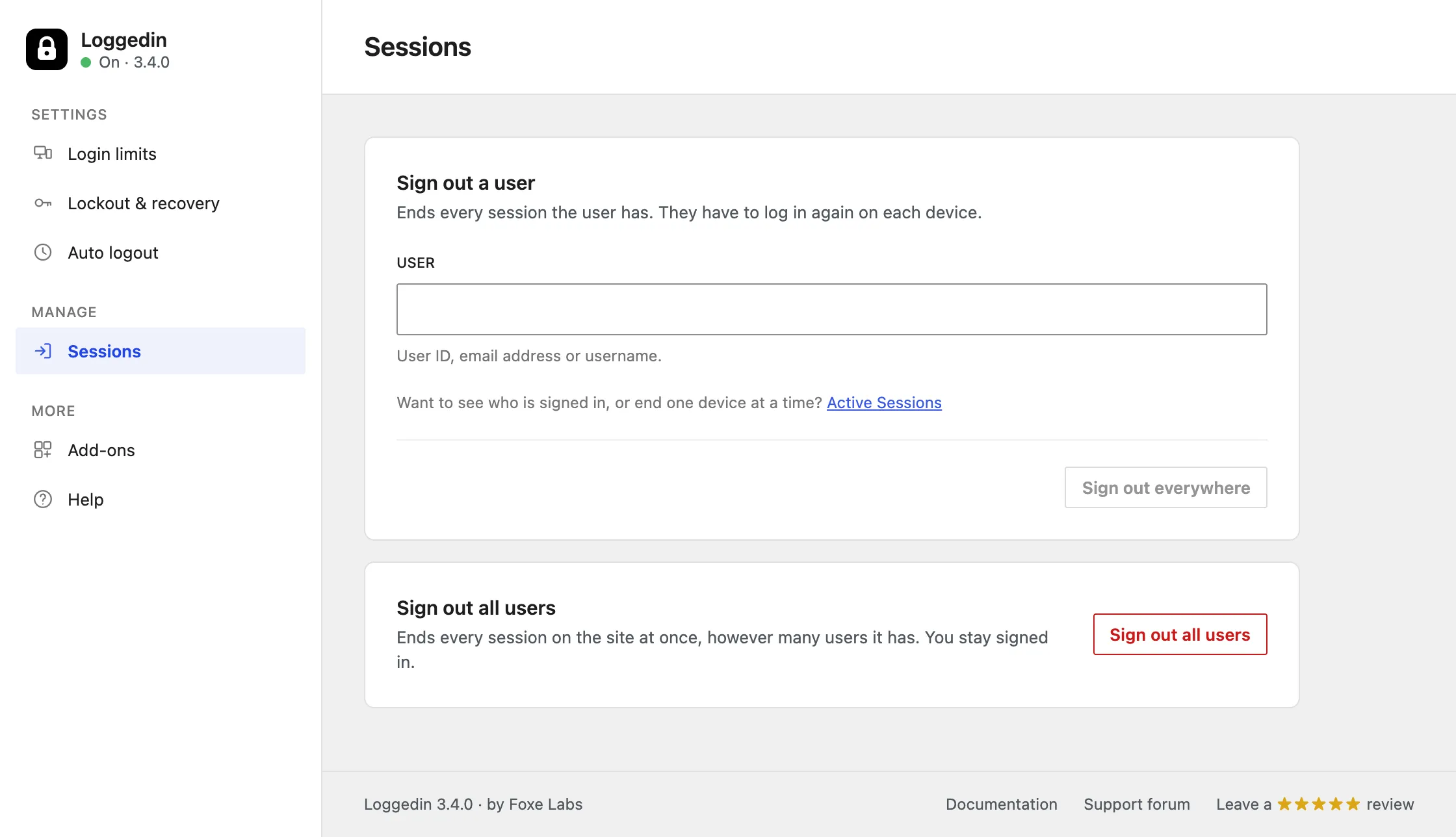
Force logout one user, or everyone
Sign one user out of every device, or log out every user on the site at once. Your own session stays signed in.
Logout All Users sets one site-wide cut-off time, so it finishes instantly at any user count.
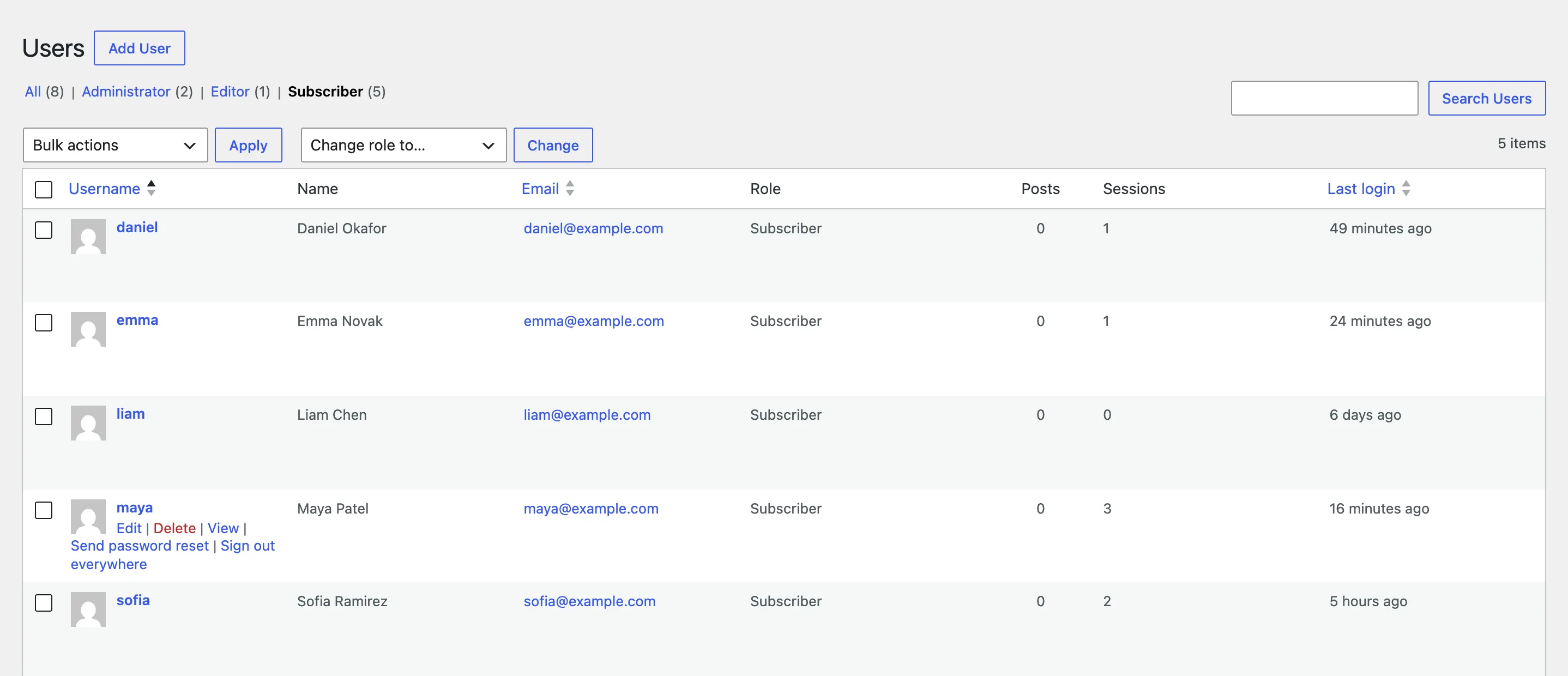
Sessions and last login, where you already look
The Users screen shows each user's active sessions and last login, with a sortable Last login column and a Sign out everywhere link on every row.
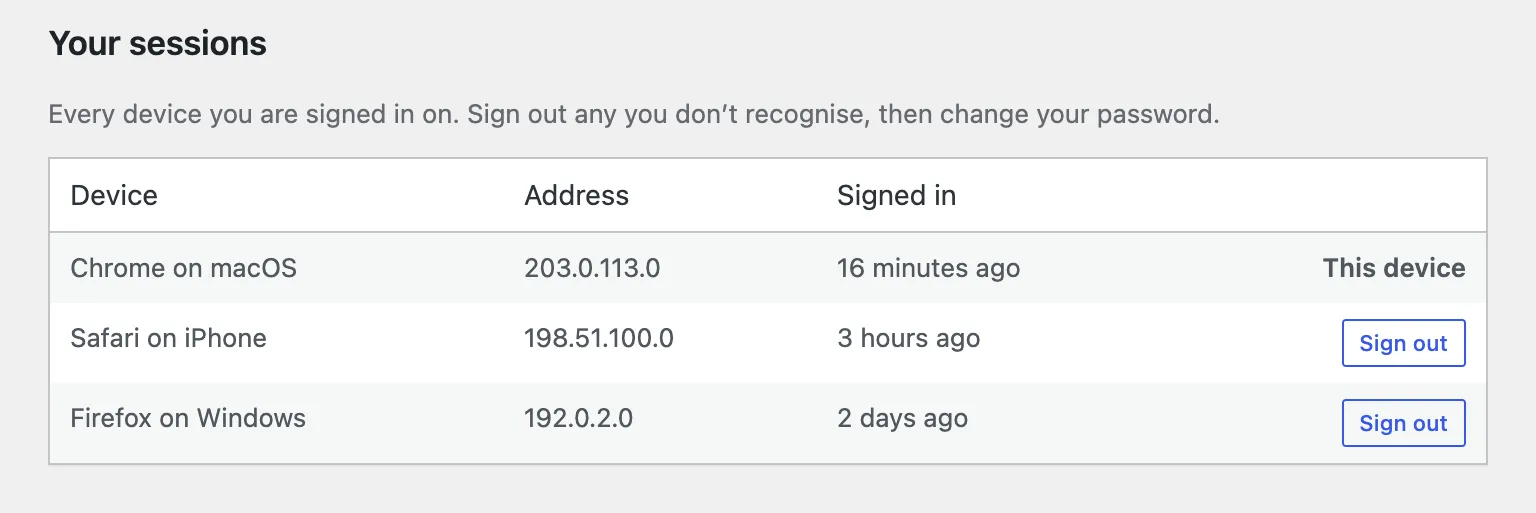
Users manage their own devices
Every user sees the devices they're signed in on, where and when, and can sign any of them out from their profile.
About Loggedin
Limit how many devices one WordPress account can be signed in on, stop account sharing, log out idle users automatically, and sign any user out of every device. Free, with no cron, no polling and no external calls.
What Loggedin does
Loggedin is a free session manager for WordPress. WordPress lets one account stay signed in on as many devices as it likes, keeps idle sessions alive for days, and gives administrators no screen to see or end them. Loggedin adds the missing controls: a limit on concurrent logins, auto logout for idle users, force logout for any user or the whole site, and session information on the Users screen and every profile.
It works with the sessions WordPress already creates, through the standard
WP_Session_Tokens API, and it needs no cron jobs, no background polling and
no external services.
What’s new in 3.4
Loggedin 3.4 is the biggest release since the plugin launched in 2016:
- A new settings screen, with pages for Login limits, Lockout & recovery, Auto logout, Sessions, Add-ons and Help.
- Auto logout is free and built in, with a countdown, per-role timeouts and session length.
- Self-unlock by email for users blocked by the limit.
- “Don’t limit administrators”, a custom blocked-login message, and a message or redirect for devices signed out by a newer login.
- Sign out other devices on a password change or reset.
- Sessions and Last login columns on the Users screen, and Your sessions on every profile.
- Wider coverage: social login, magic-link and popup login plugins are covered under Logout Oldest and Logout All, and User Switching no longer counts as a login.
Read the full story in Loggedin 3.4: the free WordPress session manager.
Who uses it
Membership sites, online courses, subscription stores, intranets and client portals use Loggedin to keep each paid seat with the person who paid for it, and sites with security or compliance rules use it for a session limit and an idle timeout. It works with MemberPress, Paid Memberships Pro, WooCommerce, LearnDash, BuddyPress and any other plugin that logs users in through WordPress.
Why it exists
Shared accounts and leaked passwords are a real risk, and most security suites bury session control under dozens of unrelated features. Loggedin does one job and keeps it light. It has been maintained since 2016 and is rated 4.9★ on WordPress.org.
Extend Loggedin when you need more.
The core plugin stays lean. Each add-on is a small, opt-in plugin that snaps into the same settings screen — install only the ones you need.
Active Sessions
A searchable admin list of everyone signed in right now, with per-device detail and one-click sign-out — for a single session, a whole user, or many users at once.
Learn more →Real-time Logout
Polls the server on an interval so a session ended elsewhere bounces open tabs straight back to the login screen, instead of lingering until the next click.
Learn more →Limit Per User
Give one account more (or fewer) concurrent sessions than your global limit, straight from the user's profile screen.
Learn more →Limit Per Role
Give administrators more headroom and keep subscribers tighter — a concurrent-session limit per WordPress role, built-in or custom.
Learn more →Frequently asked questions
What is the best free WordPress session manager?
Loggedin is a free WordPress session manager on WordPress.org, maintained since 2016 and rated 4.9 out of 5. It limits concurrent logins per account, logs out idle users, signs any user out of every device, and shows session counts and last login on the Users screen. Per-role limits, per-user limits, a live sessions list and real-time logout are optional paid add-ons.
How do I limit concurrent logins in WordPress?
Install Loggedin, go to Users → Loggedin → Login limits, set the maximum number of active logins and pick what happens at the limit — Logout Oldest, Logout All or Block New. The limit applies from each user's next login, so nobody is signed out when you save.
How do I stop account sharing on a WordPress membership site?
Set Loggedin's limit to 1. With Logout All or Logout Oldest, a second person logging in signs the first one out, so sharing one account stops being practical. With Block New, the second login is refused until the first device signs out. It works with MemberPress, Paid Memberships Pro, WooCommerce, LearnDash and other plugins that log users in through WordPress.
How do I automatically log out inactive users in WordPress?
Go to Users → Loggedin → Auto logout, turn on idle logout and set a timeout in minutes. Users see a countdown before they are signed out, each role can have its own timeout, and the check runs on the server, so a forgotten open tab doesn't keep a session alive. It's free and built in since Loggedin 3.4.0.
How do I force logout a user from all devices in WordPress?
Open Users → Loggedin → Sessions and enter the user's ID, email or username under Force Logout, use Sign out everywhere on their row on the Users screen, or run wp loggedin sessions destroy <user>. Every session of that user ends immediately.
Can I set different login limits for different user roles?
The free plugin applies one limit site-wide and can leave administrators out of it. The Limit Per Role add-on gives each role its own limit, for example five for editors and one for subscribers, and Limit Per User sets a different limit for one account from its profile.
Does Loggedin slow down my site?
No. Loggedin does its work when someone logs in or out and on its own admin screens. There is no cron, no polling and no remote request. With auto logout on, a small script tracks activity in the browser and checks in with the server at most once a minute while the page is in use.
Guides for Loggedin
Walkthroughs and write-ups covering Loggedin in practice.
Loggedin 3.4: a free WordPress session manager to limit concurrent logins and log out idle users
Loggedin 3.4 is the biggest release since 2016. A new settings screen, free auto logout, self-unlock by email, sign-out on password change, session columns on the Users screen and "Your sessions" on every profile. Here is everything that changed and how to set it up.
Read more →
How to force log out a WordPress user from every device, instantly
Ending a WordPress session on the server is easy — the user's open tabs just don't notice until they click something. Here are four ways to force a user out of every device, from the button hidden in core to a polling script that bounces their tabs to the login screen within a minute, with honest pros and cons for each.
Read more →
How to limit concurrent logins and stop account sharing in WordPress
WordPress lets one account stay signed in on as many devices as it likes — a phone, a laptop, and three friends' browsers all at once. Here are four ways to cap concurrent logins per user, from a ten-line snippet to a free plugin with three enforcement modes, with honest pros and cons for each.
Read more →Learn how we can help you build better.
Questions about a plugin, a licence, or an expert advisor — ask and get a straight answer from the team that wrote the code.