Active Sessions
See every live session and sign out any device.
- Sortable, searchable list of every user with a live session
- Per-user modal showing device, IP, login time and expiry
- Sign out one session, all of a user's sessions, or bulk-clear many users
- Columns you can hide, reorder and sort, remembered between visits
- Reads WordPress's default session storage — no extra tables
- Works with the free Loggedin core plugin
- Automatic updates & support while licensed
- 1, 5 or 10-site licenses
- 7-day money-back guarantee
- Documentation docs.foxelabs.com (opens in new tab)
- Loggedin core plugin Free · required
- Get support Straight to the team
Requires the free Loggedin plugin to be installed and active.
About Active Sessions
A searchable admin list of everyone signed in right now, with per-device detail and one-click sign-out — for a single session, a whole user, or many users at once.
What it does
WordPress tracks who is signed in, but shows you none of it. The core Loggedin plugin’s Force Logout is single-user and all-or-nothing — you have to know the account before you can act on it.
Active Sessions adds a Sessions tab to the Loggedin admin with one row per user who currently holds a live session: their active session count, last login, last IP, email and roles. It’s the answer to “who’s logged in right now?” — and the place to act on the answer.
Find the account fast
The list is a full DataViews table. Search free-text across username, email and display name; sort by username, email, session count or last login. It opens on last login, newest first, because that’s what an admin arriving on this screen is usually looking for.
Hide or reorder columns from the view options menu and choose a page size of 10, 25, 50 or 100. Your view — sort, columns, page size, density — is remembered between visits.
Per-device detail
Open any user and Active Sessions lists each of their sessions separately, newest first: the device, the IP it started from, when it signed in, and when it expires, with a plain-language “in 3 days” hint.
That per-device view is what turns a vague suspicion into a decision. A session from an IP the account holder doesn’t recognise can be ended on its own, without disturbing the browser they’re working in.
Sign out one device, one user, or many
Three levels of action, all confirmed before they run:
- Sign out on a single session ends that one device.
- Sign out all sessions ends every session that user holds — the same effect as the core plugin’s Force Logout.
- Select rows, then Sign out all clears many users in a single action, with a confirmation listing exactly who is about to be signed out.
Every destroy-all path fires the core plugin’s
loggedin_destroy_all_sessions action, so audit logging or webhooks you’ve
already hooked to Loggedin cover this add-on too.
No extra tables
Sessions are read from WordPress’s own session storage — nothing new is installed, and nothing is left behind if you remove the add-on. The list runs a single query and filters expired tokens in PHP, bounded by the number of users who have ever logged in.
Sites that swap out the session manager for a custom backend — uncommon, and mostly large enterprise hosts — see a notice on the tab instead of a partial list.
Better together
Pair it with Real-time Logout so a sign-out lands on the user’s open tabs within the polling interval rather than at their next click, and with Loggedin’s free, built-in auto logout so unattended sessions end themselves before anyone has to go looking for them.
Active Sessions in the WordPress admin
Every screen Active Sessions adds, and where to find it.
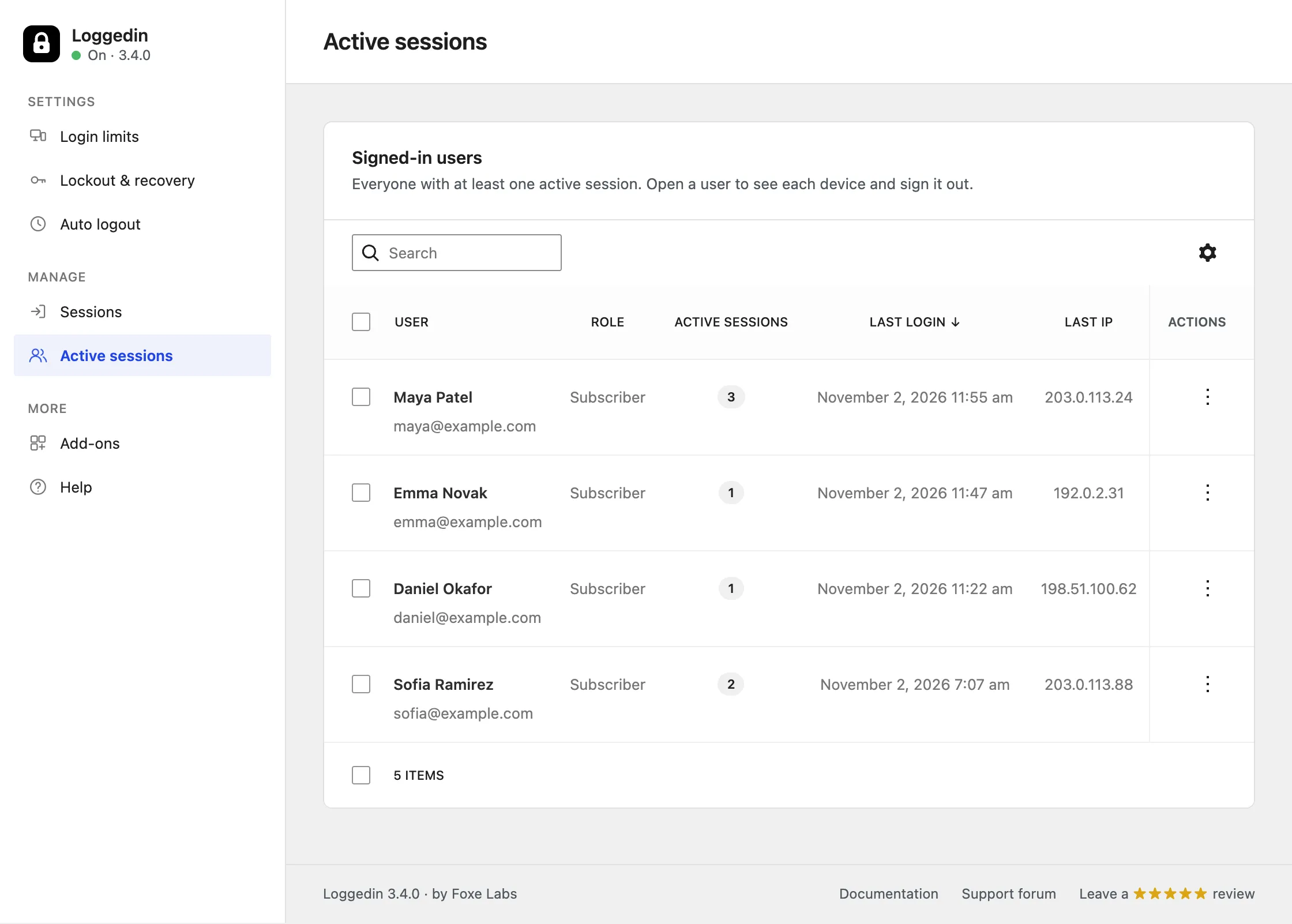
Everyone signed in, right now
One row per user with a live session — searchable by name or email, sortable by session count or last login, and openable for per-device detail. The gear menu sets the sort, the row density and which columns show.
The list opens on last login, newest first — what an admin arriving on this screen is usually looking for.
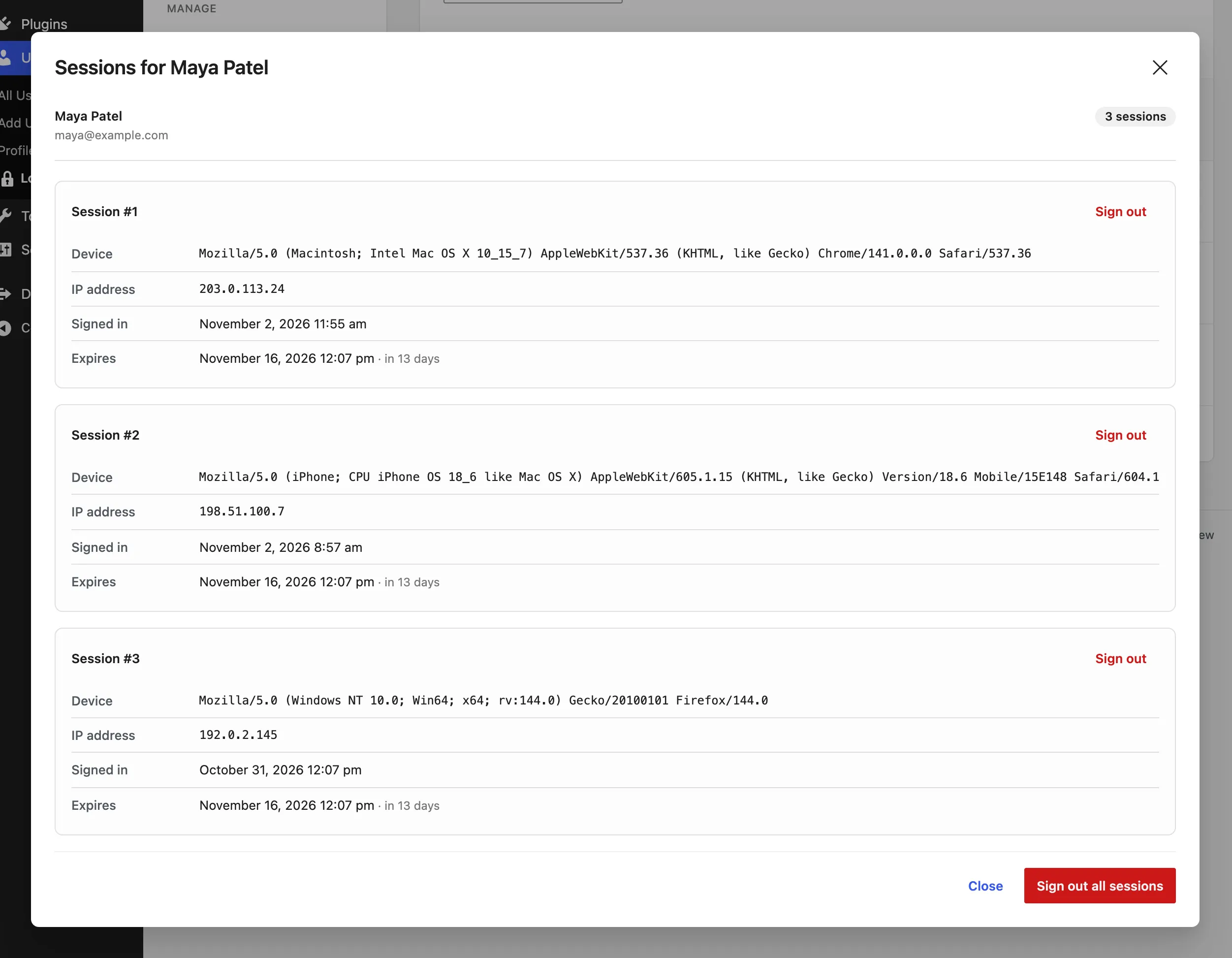
Every device, listed separately
Device, the IP the session started from, when it signed in and when it expires — with a Sign out button on each session individually.
Ending one session leaves the user's other devices untouched.
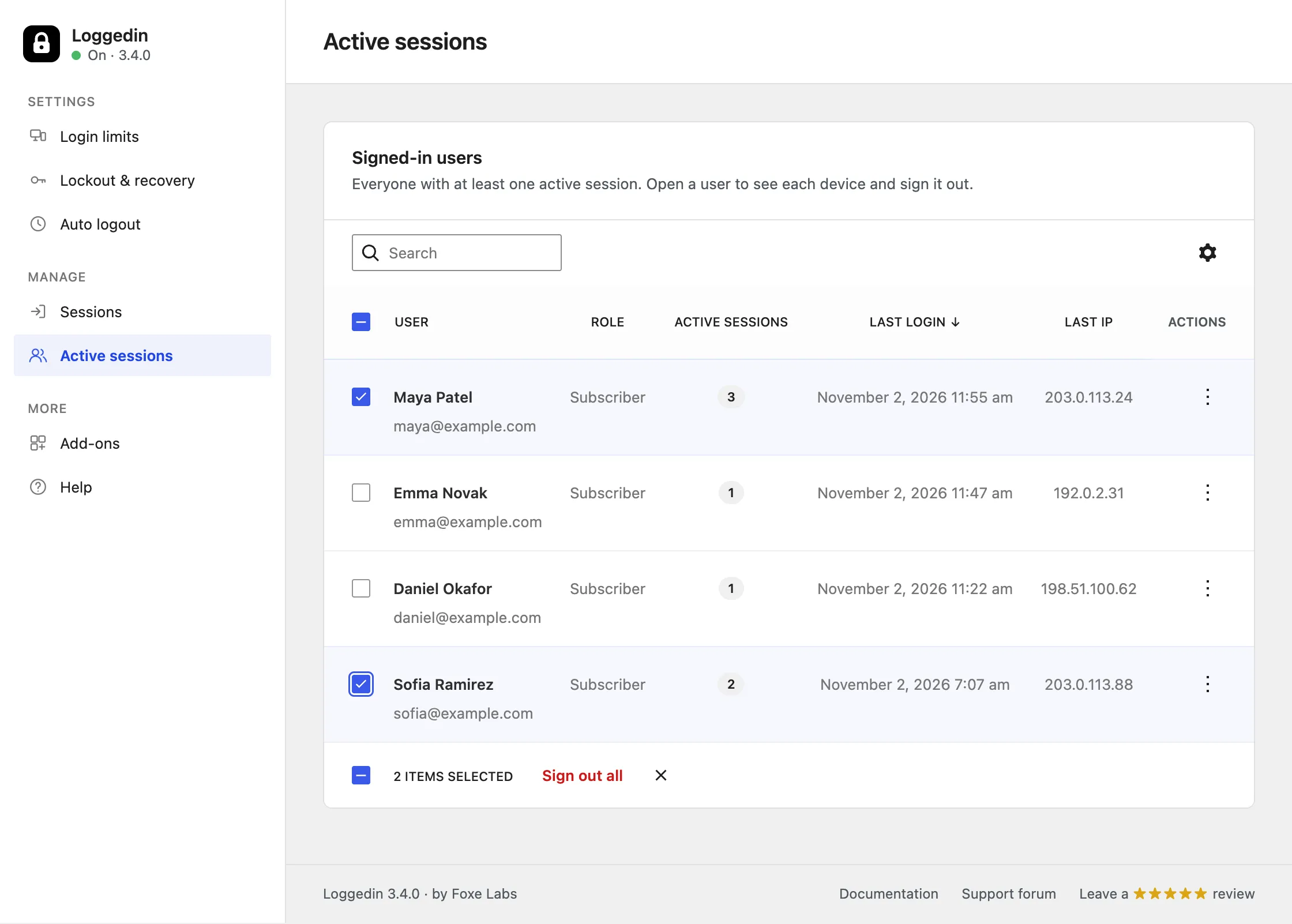
Clear many users at once
Tick rows in the list and sign them all out in one action. The bar along the bottom keeps count of what is selected before anything happens.
Every destroy-all path fires the core plugin's own action, so existing audit logging covers it.
Frequently asked questions
How do I see who is logged in to my WordPress site?
Install the free Loggedin plugin and add the Active Sessions add-on. It adds an Active sessions page under Users → Loggedin listing every user with at least one live session, with their active session count, last login time and last IP address.
Can I see which device or IP address a WordPress user logged in from?
Yes. Open any user from the Sessions list and Active Sessions shows each of their sessions separately — the device's user-agent string, the IP the session started from, when it signed in, and when the session expires.
How do I log out another user in WordPress?
From the Active sessions page, open the user and click Sign out on a single session to end that one device, or Sign out all sessions to end every session that user holds. You can also tick several users in the list and clear them all with one bulk action.
Does WordPress show active sessions by default?
No. WordPress stores session tokens per user but shows no list of them anywhere in the admin, and the free Loggedin plugin's Force Logout and Users screen columns need you to know which account to look at. Active Sessions turns that into a browsable, searchable list.
Does Active Sessions add database tables to WordPress?
No. It reads WordPress's own default session storage, so there are no extra tables to install or clean up. Sites that replace the session manager with a custom backend, such as some enterprise Redis setups, are not supported and see a notice on the tab.
How quickly does a forced sign-out take effect?
The session token is destroyed immediately, but the user's already-open tabs keep rendering the cached page until their next request. Adding the Real-time Logout add-on shrinks that gap to your polling interval, 60 seconds by default.
Learn how we can help you build better.
Questions about a plugin, a licence, or an expert advisor — ask and get a straight answer from the team that wrote the code.