Limit Per Role
Set a different session cap for each role.
- Per-role concurrent-session limits for any registered role
- Multi-role users get the most permissive cap ("highest wins")
- Custom roles from other plugins and your theme appear automatically
- Roles without a limit fall back to the global setting
- Your chosen login logic still applies — only the number changes
- Works with the free Loggedin core plugin
- Automatic updates & support while licensed
- 1, 5 or 10-site licenses
- 7-day money-back guarantee
- Documentation docs.foxelabs.com (opens in new tab)
- Loggedin core plugin Free · required
- Get support Straight to the team
Requires the free Loggedin plugin to be installed and active.
About Limit Per Role
Give administrators more headroom and keep subscribers tighter — a concurrent-session limit per WordPress role, built-in or custom.
What it does
One global number rarely fits every role. An administrator moving between a laptop, a phone and a staging login is not the same risk as a subscriber account being passed around a group chat.
Limit Per Role caps concurrent sessions per WordPress role. It adds a panel to the Loggedin settings tab listing every registered role on your site, each with a toggle and its own number.
How it behaves
Roles you leave switched off use the global limit — nothing is stored for them, so there’s no half-configured state to reason about later. Switch a role on and its number takes over for every user holding it.
Custom roles registered by other plugins or your theme appear in the list automatically, since it’s built from WordPress’s own role registry. Delete a custom role after configuring it and the next save quietly drops the orphaned entry.
Multi-role users: highest wins
WordPress users can hold several roles at once. When their roles carry different limits, the highest applies.
| Roles held | Configured limits | Effective cap |
|---|---|---|
| Subscriber | 2 | 2 |
| Editor + Shop Manager | 3, 5 | 5 |
| Author | none | Global limit |
The rule is deliberately permissive. A session limit denies access, so when rules conflict the loose value is the safe one — nobody should be locked out of their account because a sibling role was configured more tightly.
Worth knowing if you also use Loggedin’s built-in auto logout: its per-role idle timeouts resolve the opposite way, shortest wins, because an idle timeout only ends a session nobody is using. A user’s extra role can raise their session limit and lower their idle timeout.
Only the number changes
Your Login Logic setting still decides what happens at the cap — block the new login, log out the oldest session, or log out all of them. Limit Per Role changes how many sessions a user is allowed, not what happens when they exceed it.
Running Limit Per User too? Per-user overrides take precedence over these role limits: per-user → per-role → global.
Limit Per Role in the WordPress admin
Every screen Limit Per Role adds, and where to find it.
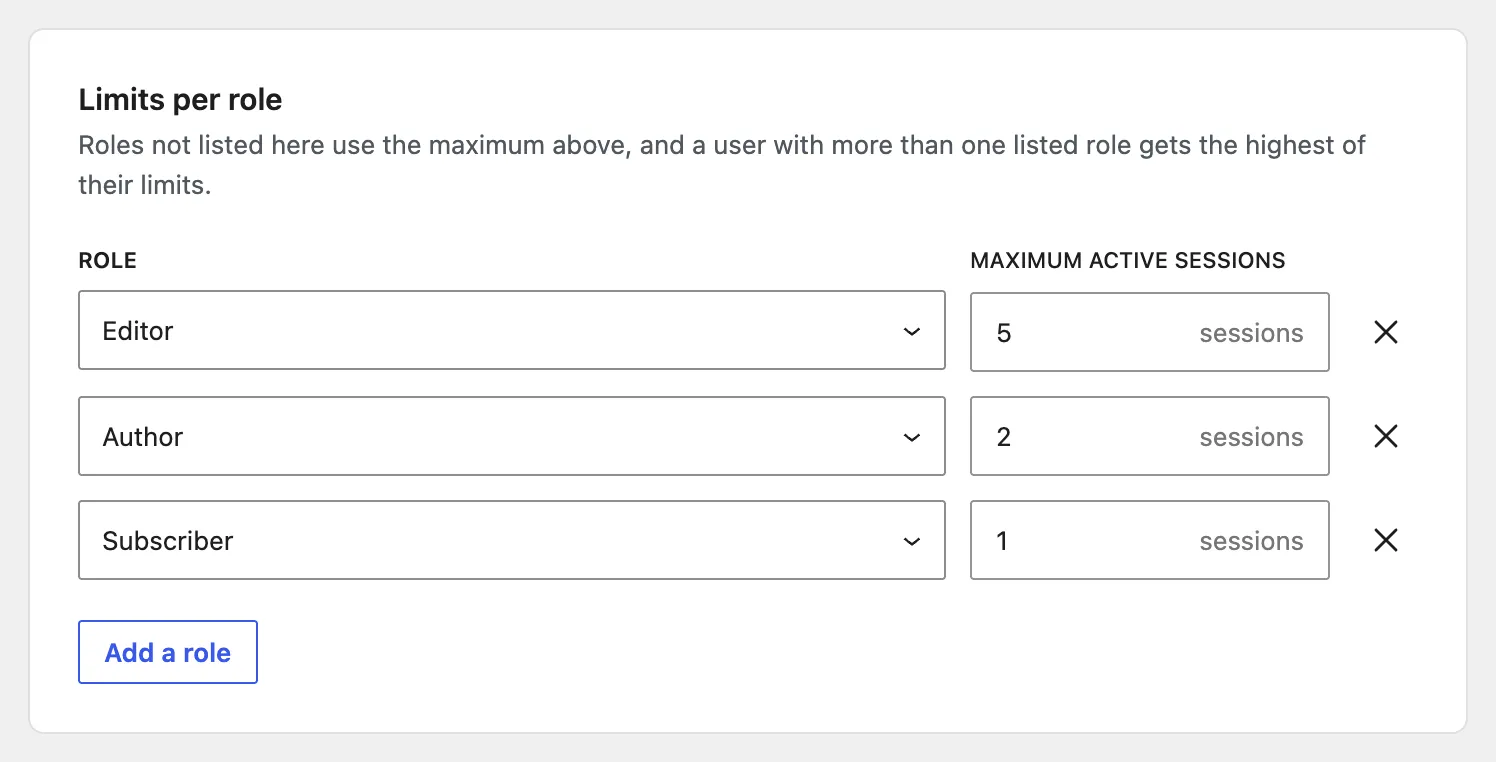
One row per role you want to override
Add a row, pick the role and give it its own number. Roles you leave out keep using the global limit, and a user holding several roles with limits gets the highest of them.
Custom roles registered by another plugin or your theme appear in the picker automatically.
Frequently asked questions
How do I set different login limits for different WordPress roles?
Install the free Loggedin plugin with the Limit Per Role add-on and open Users → Loggedin → Settings. Every registered role gets a row with a toggle and a number, so you can allow administrators five sessions while capping subscribers at one.
What happens to roles I do not configure?
They use the global concurrent-session limit from the core plugin's settings. Unchecking a role removes its custom limit entirely rather than storing a zero, so it goes straight back to the global fallback.
Which limit applies to a user with several roles?
The highest one. An editor who is also a shop manager, with three sessions allowed for editors and five for shop managers, gets five. The rule is deliberately permissive so an extra role never locks someone out of their own account.
Do custom roles from other plugins work?
Yes. The role list is read from WordPress itself, so roles registered by WooCommerce, a membership plugin or your theme appear automatically. If a custom role is deleted later, the next save drops the orphaned entry.
Does this override a per-user limit?
No, it is the other way round. Per-user beats per-role, and per-role beats the global setting. If an account has a Limit Per User override, that number applies whatever its roles allow.
Does a role limit change what happens when the cap is hit?
No. Only the number changes. Your Login Logic setting — block the new login, log out the oldest session, or log out all sessions — still decides the outcome when a user reaches their cap.
Learn how we can help you build better.
Questions about a plugin, a licence, or an expert advisor — ask and get a straight answer from the team that wrote the code.